

Your Android phone should get better and more helpful over time, even while you wait for the to arrive. Like the recently announced that supports devices going back to Android 6.0, we’re building new features that improve the experience of billions of devices around the world. Today, we’re introducing five new features to your Android phone for added safety, restful sleep and more.
1. Save precious seconds during an emergency
Your Android phone can’t put out a fire, but it can provide help sooner with Android Emergency Location Service (ELS) now available to over 800 million people across 29 countries. Since in 2016, we’ve worked with local public safety officials to around the world by improving access to accurate location information.
Now, your Android phone can share your device language setting when you dial your local emergency number wherever ELS is available. So if you don’t speak the local language, emergency operators can get the appropriate translator sooner and send you the help you need.
Android ELS is available on devices running Android 4.1 and above with Google Play Services installed.
2. Get alerted to earthquakes around you
Android phones around the world can with the Android Earthquake Alerts System, creating the world’s largest earthquake detection network. To start, this will lead to faster, more accurate earthquake information when you look up “earthquake near me” on Google Search.
The Android Earthquake Alerts System will be available on devices running Android 5.0 and above. And if you are in California, you will now receive earthquake alerts powered by ® directly on your Android phone.
3. Get more done in the car
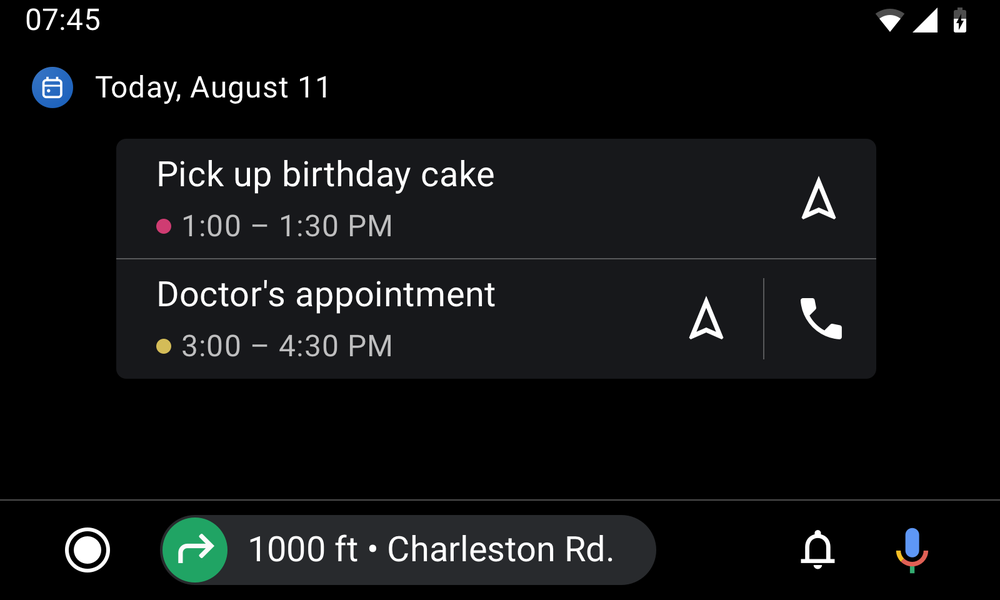
When driving, your safety is dependent on keeping your hands on the wheel and eyes on the road. With new updates to , you can stay on top of your day without having to glance at your phone.
Get a quick look into your daily schedule on your car display with the new calendar app. With a few taps from a calendar event, get directions to the bakery where you ordered that birthday cake or make a quick phone call to tell them you'll be arriving soon.
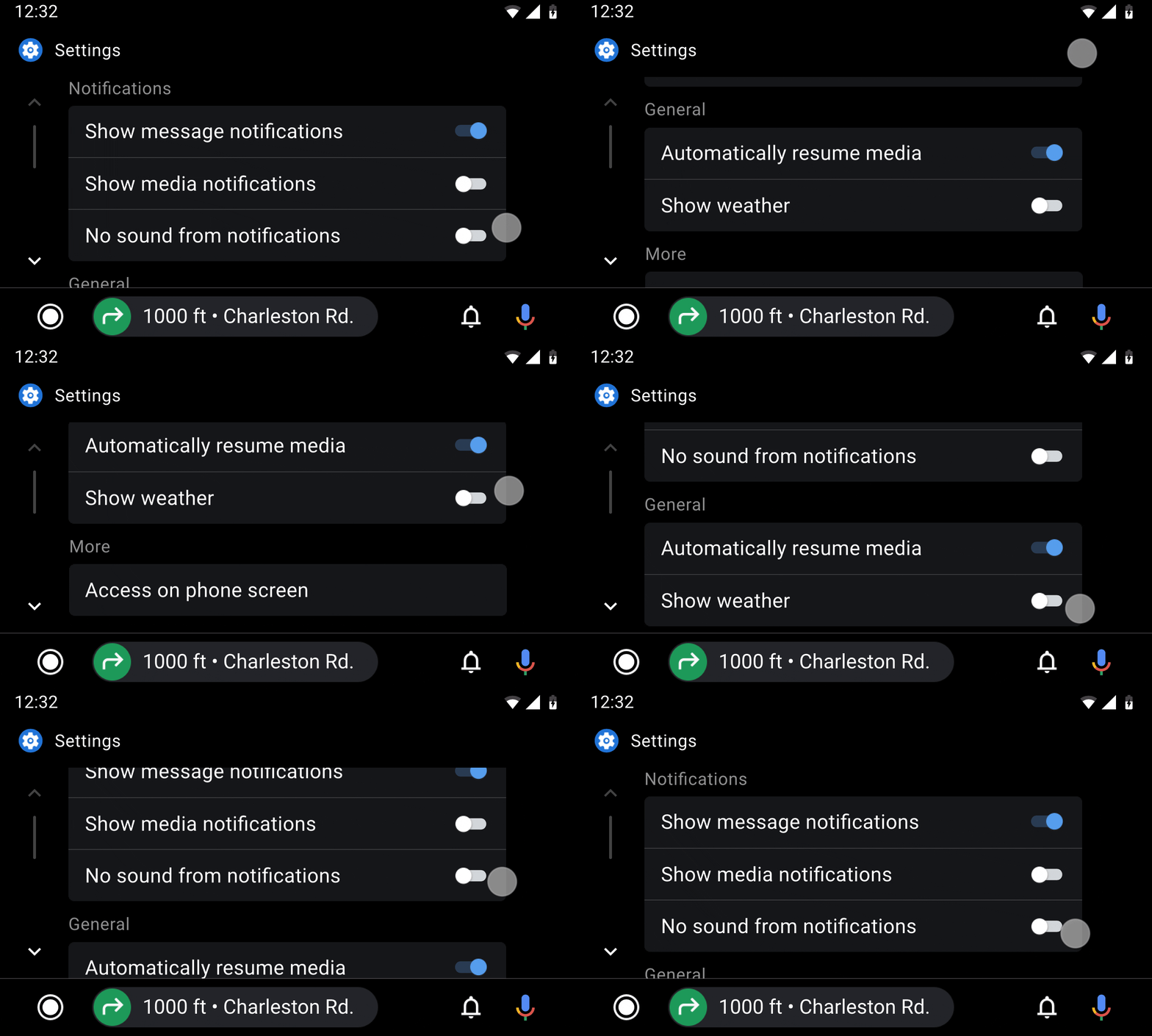
And with the new settings app, you can manage your Android Auto preferences directly on your car display.
4. Rest easy, without interruptions
Remember that time when checking one notification turned into staying up an hour past your bedtime? We bet you weren’t too happy. So we Bedtime mode to remind you when it’s time for bed and limit interruptions by keeping your phone dark and quiet while you sleep.
Now with the addition of the Bedtime tab in Clock, you can maintain a consistent sleep schedule, track your screen time at night, and fall asleep to soothing sounds from Calm, Spotify, YouTube Music and more. And if you dread feeling startled by your alarm, you can wake up more gently with visual cues from the Sunrise Alarm and your favorite sounds or song.
The Bedtime tab in the is now available for devices running Android 6.0 and above. For devices with installed, turn on Bedtime mode in your settings or schedule it directly from the Clock app.
5. Lookout makes the physical world more accessible
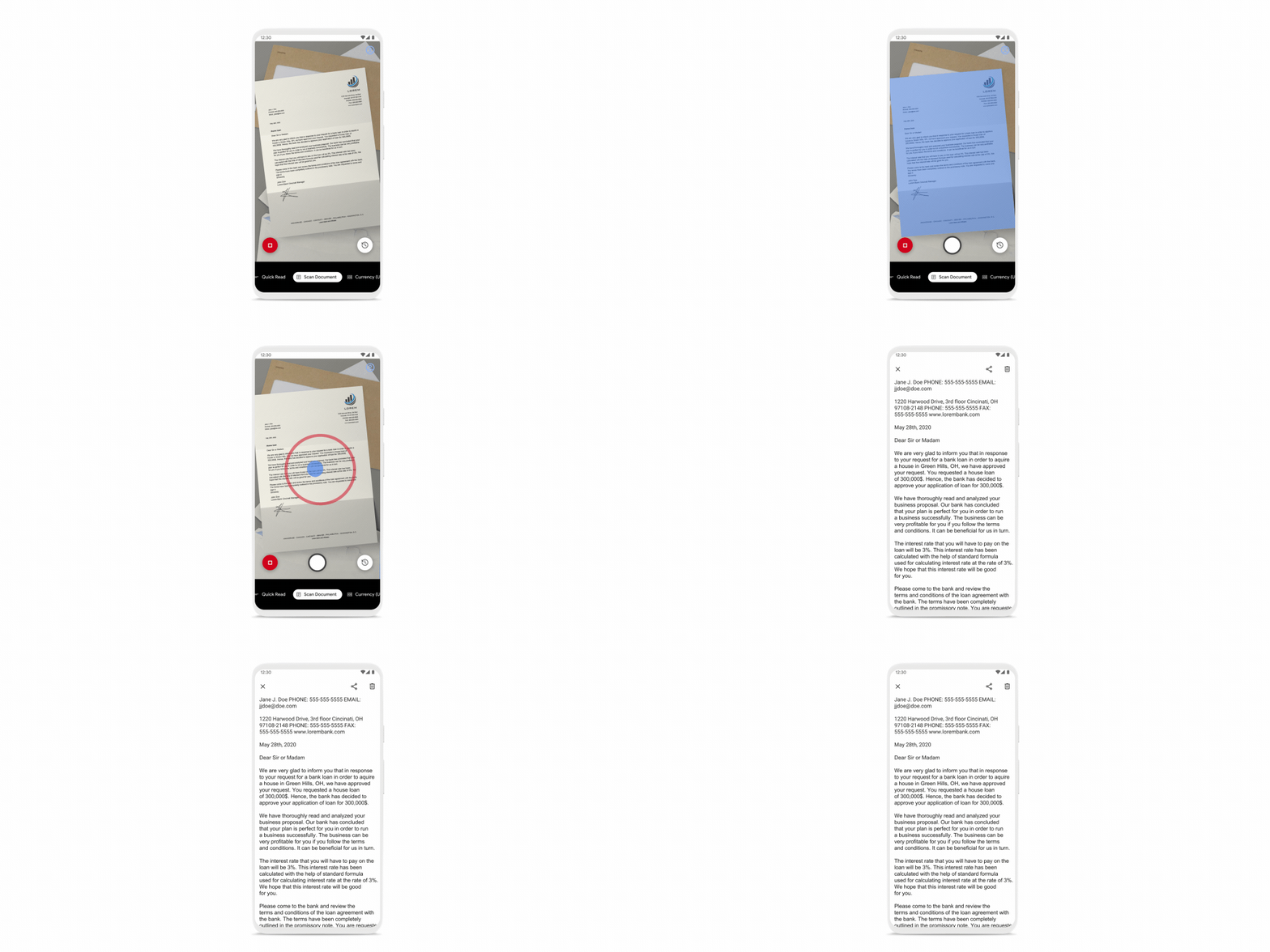
We’re bringing to , an app that uses computer vision to help people who are blind or low-vision get things done faster and more easily. Built with and for the blind and low-vision community, this update debuts two new modes and a more accessible design. Now Lookout can scan long form documents into readable text, identify products from their food labels, and is even more compatible with screen readers. It also includes expansion to new languages and phones, automatic flash, and more.
Lookout on Google Play today, available for all devices with more than 2GB of RAM running Android 6.0 and later.

1. Save precious seconds during an emergency
Your Android phone can’t put out a fire, but it can provide help sooner with Android Emergency Location Service (ELS) now available to over 800 million people across 29 countries. Since in 2016, we’ve worked with local public safety officials to around the world by improving access to accurate location information.
Now, your Android phone can share your device language setting when you dial your local emergency number wherever ELS is available. So if you don’t speak the local language, emergency operators can get the appropriate translator sooner and send you the help you need.
Android ELS is available on devices running Android 4.1 and above with Google Play Services installed.
2. Get alerted to earthquakes around you
Android phones around the world can with the Android Earthquake Alerts System, creating the world’s largest earthquake detection network. To start, this will lead to faster, more accurate earthquake information when you look up “earthquake near me” on Google Search.
The Android Earthquake Alerts System will be available on devices running Android 5.0 and above. And if you are in California, you will now receive earthquake alerts powered by ® directly on your Android phone.
3. Get more done in the car
When driving, your safety is dependent on keeping your hands on the wheel and eyes on the road. With new updates to , you can stay on top of your day without having to glance at your phone.
Get a quick look into your daily schedule on your car display with the new calendar app. With a few taps from a calendar event, get directions to the bakery where you ordered that birthday cake or make a quick phone call to tell them you'll be arriving soon.
And with the new settings app, you can manage your Android Auto preferences directly on your car display.
4. Rest easy, without interruptions
Remember that time when checking one notification turned into staying up an hour past your bedtime? We bet you weren’t too happy. So we Bedtime mode to remind you when it’s time for bed and limit interruptions by keeping your phone dark and quiet while you sleep.
Now with the addition of the Bedtime tab in Clock, you can maintain a consistent sleep schedule, track your screen time at night, and fall asleep to soothing sounds from Calm, Spotify, YouTube Music and more. And if you dread feeling startled by your alarm, you can wake up more gently with visual cues from the Sunrise Alarm and your favorite sounds or song.
The Bedtime tab in the is now available for devices running Android 6.0 and above. For devices with installed, turn on Bedtime mode in your settings or schedule it directly from the Clock app.
5. Lookout makes the physical world more accessible
We’re bringing to , an app that uses computer vision to help people who are blind or low-vision get things done faster and more easily. Built with and for the blind and low-vision community, this update debuts two new modes and a more accessible design. Now Lookout can scan long form documents into readable text, identify products from their food labels, and is even more compatible with screen readers. It also includes expansion to new languages and phones, automatic flash, and more.
Lookout on Google Play today, available for all devices with more than 2GB of RAM running Android 6.0 and later.