

Joystiq
Joystiq News
If you’re active on Facebook or Instagram, you might have noticed prompts about a setting called “link history.” The feature allows users to keep track of all of the links they visit via Facebook and Instagram’s in-app browsers.
According to Meta, the feature allows users to ensure they “never lose” a link. “Easily get back to recent links you’ve visited with your Facebook browsing activity now saved in one place,” an in-app notification about the feature says.
But, as Gizmodo , the feature also gives Meta a convenient way to improve its targeted advertising, which has following Apple’s crackdown on app tracking. “Keep in mind that when link history is on, we may use link history information from Facebook’s Mobile Browser to improve your ads across Meta technologies,” the company notes in a .
Instagram has a similar feature, which keeps tabs on links users visit via the app’s browser. Though it seems many users are just now discovering the settings, a Meta spokesperson confirmed the features began rolling out last summer.
Though link history is not enabled by default, it’s the kind of setting many people may opt into without giving much thought, especially because the company markets it as a way to avoid “losing” links. That’s sparked concern among some privacy advocates who worry Meta is using increasingly sneaky ways to gather data about users’ online activity.
The good news, however, is that it’s easy to double check if you have link history enabled, and opt-out if you do.
, users will need to open a link from within the app and tap on … menu to open the settings from the in-app browser. Then, look for the “link history” toggle. If it’s on, you’ll need to turn it off, and then confirm via the pop-up that you want it disabled.
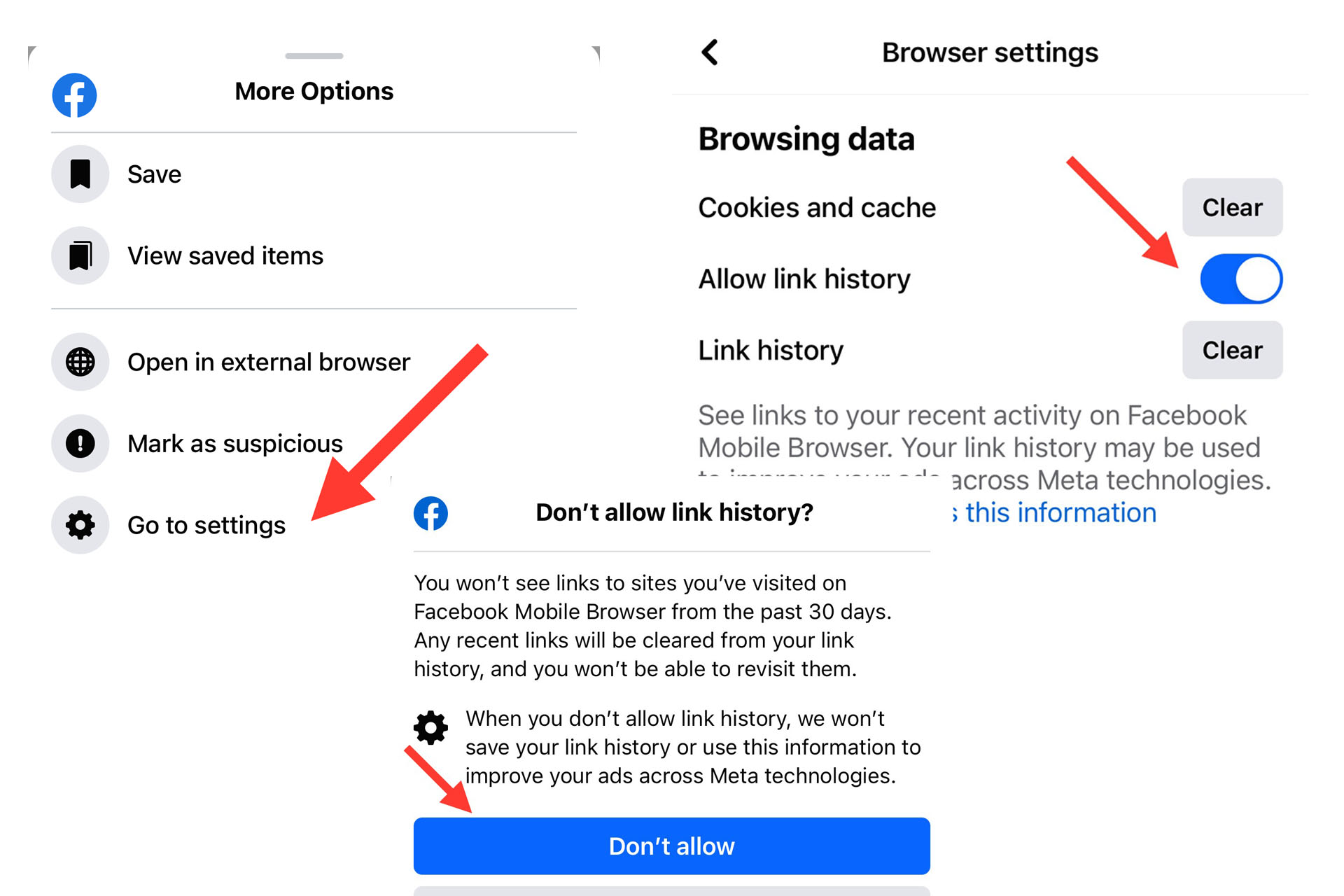
Screenshots via Facebook
The process is pretty much the same: Head to the in-app browser’s settings, look for “link history” and confirm your choice.
Of note, though both apps will immediately delete your link history from their respective apps, Meta says it can take up to 90 days “to complete the deletion process.” This means your previous browsing activity could still play a role in your targeted ads for several weeks after you’ve disabled link tracking.
Of course, the company still has other ways your online activity, so opting out of link history alone won’t be enough to fully take back control of your data. Privacy conscious ad-haters who live in the European Union, however, do have another option, though it may be even less appealing. Meta recently began offering the ability for EU users to opt out of Facebook and Instagram ads entirely, in exchange for a monthly fee.
This article originally appeared on Engadget at
Console Bang News!
According to Meta, the feature allows users to ensure they “never lose” a link. “Easily get back to recent links you’ve visited with your Facebook browsing activity now saved in one place,” an in-app notification about the feature says.
But, as Gizmodo , the feature also gives Meta a convenient way to improve its targeted advertising, which has following Apple’s crackdown on app tracking. “Keep in mind that when link history is on, we may use link history information from Facebook’s Mobile Browser to improve your ads across Meta technologies,” the company notes in a .
Instagram has a similar feature, which keeps tabs on links users visit via the app’s browser. Though it seems many users are just now discovering the settings, a Meta spokesperson confirmed the features began rolling out last summer.
Though link history is not enabled by default, it’s the kind of setting many people may opt into without giving much thought, especially because the company markets it as a way to avoid “losing” links. That’s sparked concern among some privacy advocates who worry Meta is using increasingly sneaky ways to gather data about users’ online activity.
The good news, however, is that it’s easy to double check if you have link history enabled, and opt-out if you do.
, users will need to open a link from within the app and tap on … menu to open the settings from the in-app browser. Then, look for the “link history” toggle. If it’s on, you’ll need to turn it off, and then confirm via the pop-up that you want it disabled.
Screenshots via Facebook
The process is pretty much the same: Head to the in-app browser’s settings, look for “link history” and confirm your choice.
Of note, though both apps will immediately delete your link history from their respective apps, Meta says it can take up to 90 days “to complete the deletion process.” This means your previous browsing activity could still play a role in your targeted ads for several weeks after you’ve disabled link tracking.
Of course, the company still has other ways your online activity, so opting out of link history alone won’t be enough to fully take back control of your data. Privacy conscious ad-haters who live in the European Union, however, do have another option, though it may be even less appealing. Meta recently began offering the ability for EU users to opt out of Facebook and Instagram ads entirely, in exchange for a monthly fee.
This article originally appeared on Engadget at
Console Bang News!