

Today we’re serving up , freshly baked for the enterprise.
The newest release of Android delivers AI-powered productivity tools, security enhancements, new features to promote digital wellbeing, and support for a range of use cases.
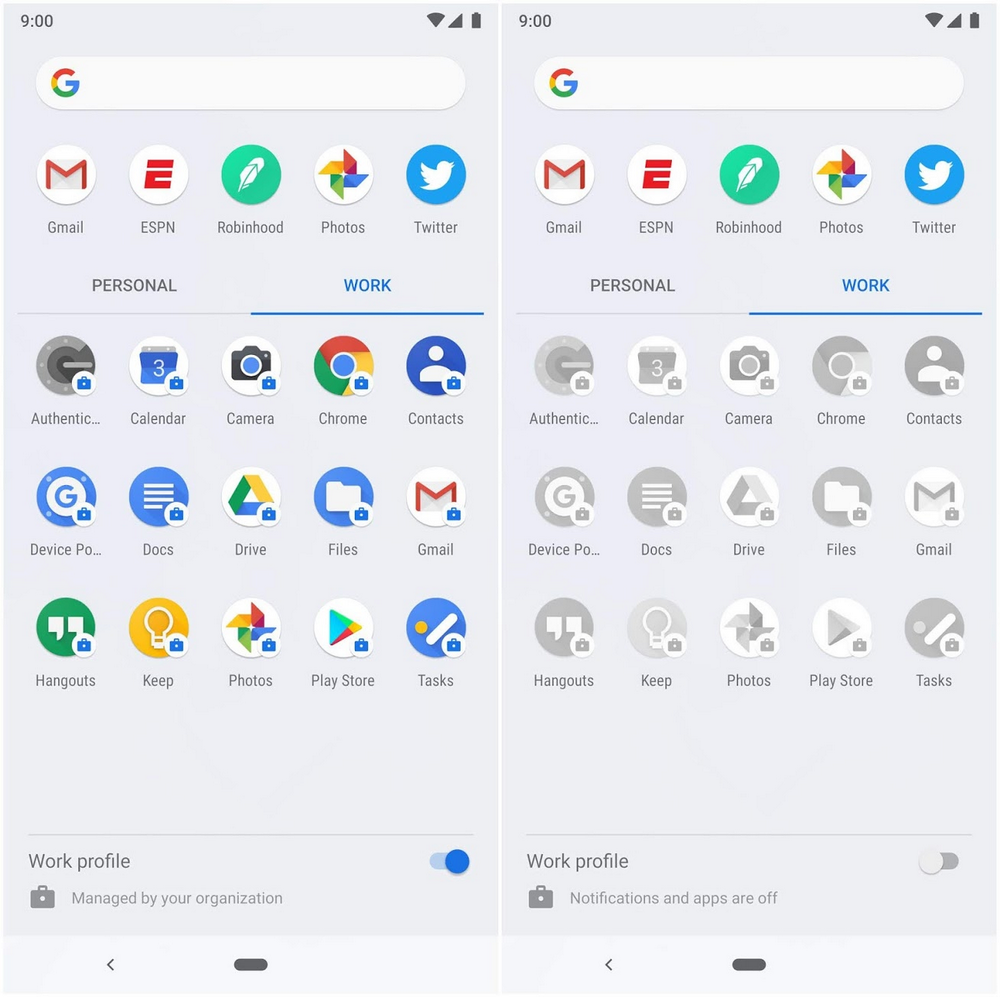
Apps in the work profile are bundled together, with a toggle available for switching off when it’s time to step away from work.
In Android 9, work apps have their own tab in the All Apps menu, making them easier to find and distinctly separate from personal apps. Android 9 also brings support for in-app switching between apps that exist in both the work and personal profiles.
The work profile also complements Android’s focus on . While our phones are a big part of our work lives, it’s important to be able to disconnect. A new toggle feature lets users turn off work apps and notifications quickly and easily.
Android 9 also includes new digital wellbeing tools like the Dashboard and Do Not Disturb, which helps users monitor device usage and turn off all visual interruptions respectively. These tools are available today in beta on Pixel devices. You can learn more about the beta program .
AI baked in
To help your team get things done faster, Android 9 introduces , an AI-powered feature that displays suggested actions based on a user’s context. These appear in the Android launcher, Smart Text Selection, the Google Search app, Google Assistant, and the Play Store.
For example, if an employee is working, they might see a suggestion to share a Drive folder.
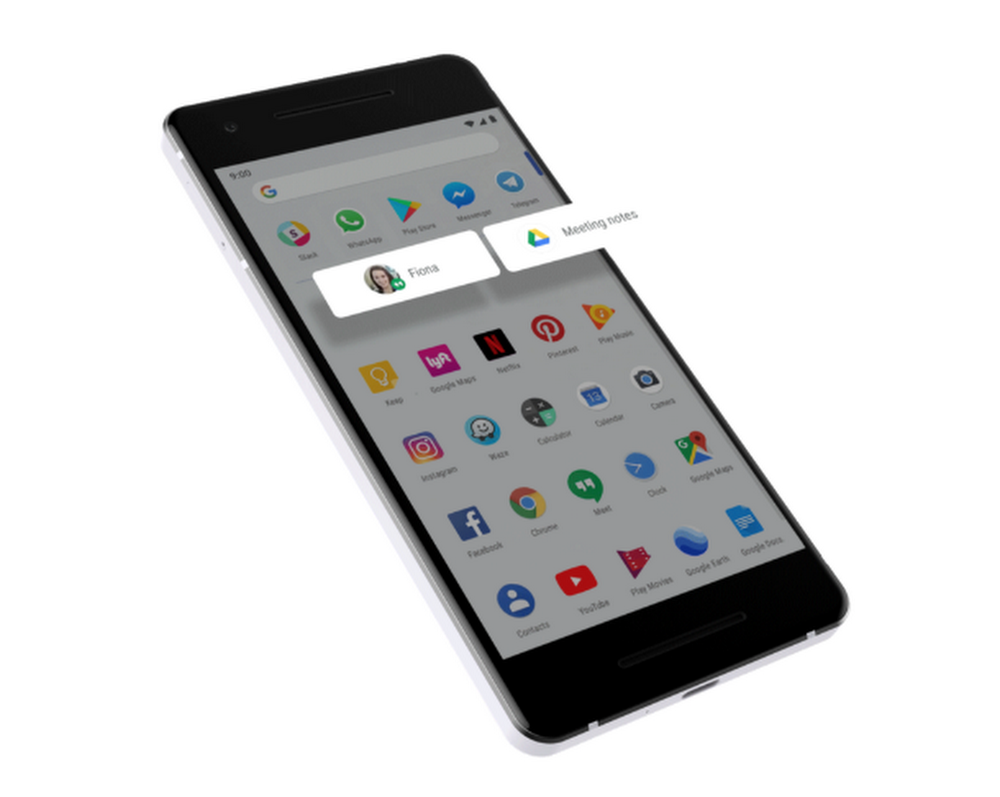
App Actions suggest specific tasks throughout the day.
Over time, users will see prompts to take specific actions from both personal and work apps as the phone learns about how they use the device. It’s one more way that Android works behind the scenes to make the phone more responsive to individual needs.
New recipes for dedicated devices
Many Android devices in organizations are dedicated to a , such as ruggedized tablets, point-of-sale terminals, digital signage, or informational kiosks.
In Android 9, admins have full flexibility to show or hide elements of the Android user-interface including the status bar and navigation buttons. Enterprise mobility management providers can set a custom home screen, and populate it with the apps of their choice.
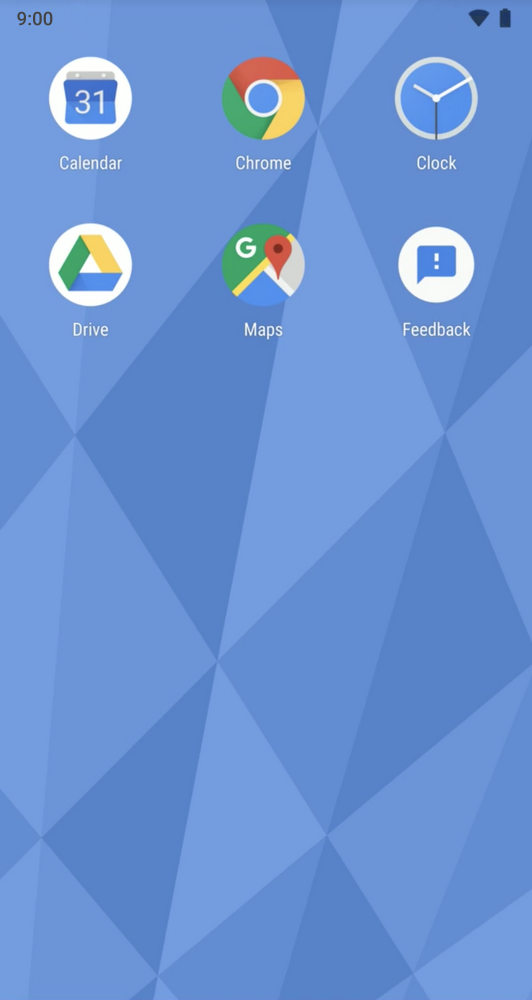
Admins can use a custom launcher and select multiple apps for a focused experience on single-use devices.
By doing this, admins can enable switching between a set of apps. So, for example, a restaurant worker could take an order on their tablet, then switch back to the menu or to a payment app to process the transaction.
Additionally, Android 9 supports multiple people using a shared device. Devices can be configured as a kiosk, with a user’s data erased at the end of every session or set up for multiple employees. An employee working the day-shift can hand off their device to their colleague working late with data preserved between sessions but fully separated at all times.
Tasty slices of security and privacy
Android 9 enables industry-leading hardware security capabilities by leveraging a phone’s similar to the “secure elements” built into credit and smart cards. Android 9 is also the first major operating system to support secure transactions via Protected Confirmation APIs as well as enabling app developers to leverage the tamper-resistant hardware (Strongbox) which raises the bar when it comes to protecting sensitive app data. We also continue to harden the Android platform through additional , to make bugs harder to exploit and prevent certain types of bugs from becoming vulnerabilities.
Android 9 protects all data that enters or leaves a device with (TLS) by default. It’s also the first mobile operating system to support for private browsing. Additionally, IT administrators can require different PINs and timeout rules for personal and work profiles and set policies to further prevent data sharing across profiles. New APIs will be available that work with keys and certificates to securely identify devices accessing corporate resources.
Served up to a range of devices
This is just a taste of the goodness in Android 9. For more details on all the new work features and APIs in Android 9, see our developer .
Android 9 is available starting today on Google Pixel phones and will be available later this fall on a range of devices, including devices and those featured in the .

The newest release of Android delivers AI-powered productivity tools, security enhancements, new features to promote digital wellbeing, and support for a range of use cases.
Apps in the work profile are bundled together, with a toggle available for switching off when it’s time to step away from work.
In Android 9, work apps have their own tab in the All Apps menu, making them easier to find and distinctly separate from personal apps. Android 9 also brings support for in-app switching between apps that exist in both the work and personal profiles.
The work profile also complements Android’s focus on . While our phones are a big part of our work lives, it’s important to be able to disconnect. A new toggle feature lets users turn off work apps and notifications quickly and easily.
Android 9 also includes new digital wellbeing tools like the Dashboard and Do Not Disturb, which helps users monitor device usage and turn off all visual interruptions respectively. These tools are available today in beta on Pixel devices. You can learn more about the beta program .
AI baked in
To help your team get things done faster, Android 9 introduces , an AI-powered feature that displays suggested actions based on a user’s context. These appear in the Android launcher, Smart Text Selection, the Google Search app, Google Assistant, and the Play Store.
For example, if an employee is working, they might see a suggestion to share a Drive folder.
App Actions suggest specific tasks throughout the day.
Over time, users will see prompts to take specific actions from both personal and work apps as the phone learns about how they use the device. It’s one more way that Android works behind the scenes to make the phone more responsive to individual needs.
New recipes for dedicated devices
Many Android devices in organizations are dedicated to a , such as ruggedized tablets, point-of-sale terminals, digital signage, or informational kiosks.
In Android 9, admins have full flexibility to show or hide elements of the Android user-interface including the status bar and navigation buttons. Enterprise mobility management providers can set a custom home screen, and populate it with the apps of their choice.
Admins can use a custom launcher and select multiple apps for a focused experience on single-use devices.
By doing this, admins can enable switching between a set of apps. So, for example, a restaurant worker could take an order on their tablet, then switch back to the menu or to a payment app to process the transaction.
Additionally, Android 9 supports multiple people using a shared device. Devices can be configured as a kiosk, with a user’s data erased at the end of every session or set up for multiple employees. An employee working the day-shift can hand off their device to their colleague working late with data preserved between sessions but fully separated at all times.
Tasty slices of security and privacy
Android 9 enables industry-leading hardware security capabilities by leveraging a phone’s similar to the “secure elements” built into credit and smart cards. Android 9 is also the first major operating system to support secure transactions via Protected Confirmation APIs as well as enabling app developers to leverage the tamper-resistant hardware (Strongbox) which raises the bar when it comes to protecting sensitive app data. We also continue to harden the Android platform through additional , to make bugs harder to exploit and prevent certain types of bugs from becoming vulnerabilities.
Android 9 protects all data that enters or leaves a device with (TLS) by default. It’s also the first mobile operating system to support for private browsing. Additionally, IT administrators can require different PINs and timeout rules for personal and work profiles and set policies to further prevent data sharing across profiles. New APIs will be available that work with keys and certificates to securely identify devices accessing corporate resources.
Served up to a range of devices
This is just a taste of the goodness in Android 9. For more details on all the new work features and APIs in Android 9, see our developer .
Android 9 is available starting today on Google Pixel phones and will be available later this fall on a range of devices, including devices and those featured in the .