

Windows (x64) | File size: 25 MB
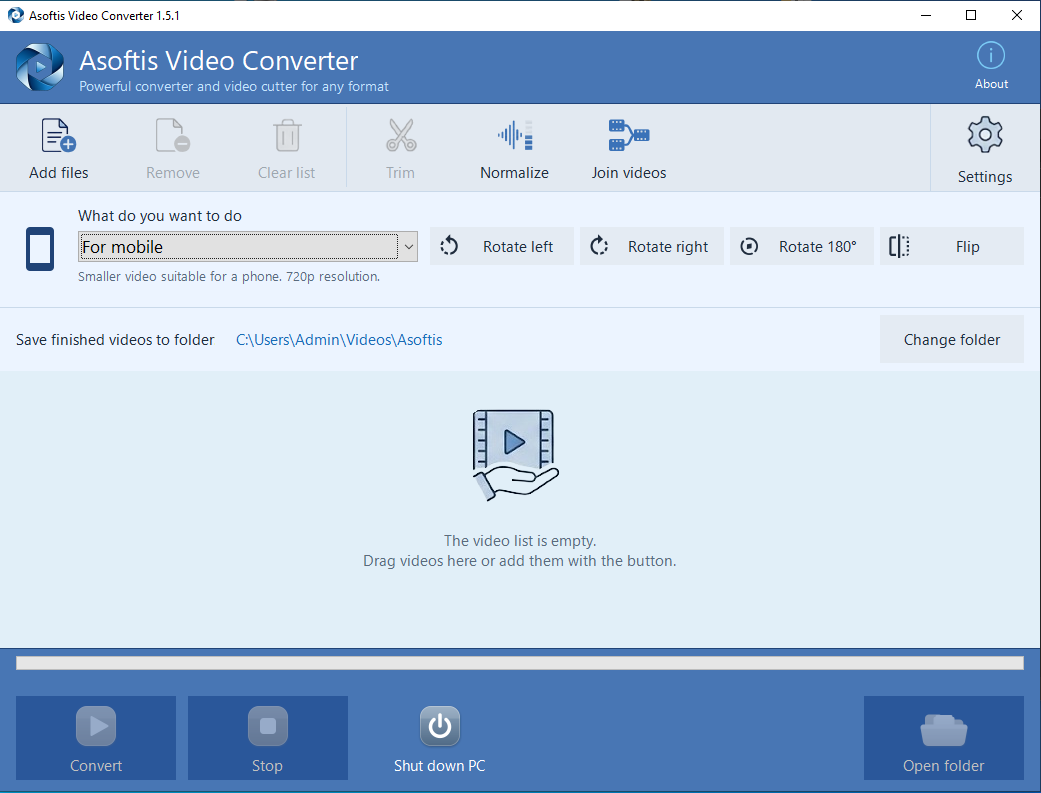
Asoftis Video Converter converts videos and extracts audio from them - no knowledge of codecs and bitrates needed. Instead of technical parameters it offers ready-made presets such as "For mobile", "For TV" or "For YouTube": just choose where you need the video and the program picks the right settings for you. The interface is in English, Czech, Slovak and Polish, with large buttons and a simple workflow.
Besides conversion itself, it handles basic editing too - trimming the start and end right in the frame preview, rotating and flipping the picture, or evening out the volume between recordings. You can convert videos one by one or in a batch: the program works through the queue by itself while you do something else.
Main benefits
- ready-made presets for mobile, TV, YouTube, Facebook and Instagram
- new For e-mail option - send a video to your grandchildren as an attachment
- conversion and editing of video in one program
- joining holiday clips into one film
- batch conversion of multiple files at once, no waiting at the computer
- interface in English, Czech, Slovak and Polish, large buttons and a simple workflow
More advantages
- output to MP4, MKV, MOV, AVI or WebM, audio to MP3
- extracting audio from video into a separate file
- trimming video from-to right in the frame preview
- rotating, flipping and evening out the volume of recordings
- chooses between the graphics card and the processor by itself - if the card does not help, it converts with the processor
- never overwrites an existing file and keeps the original capture date
- convert overnight: the computer stays awake and can switch itself off when done
- new versions with one click, no searching the web
Overview of main features
Ready-made presets for devices and social networks
Ten ready-made presets - for mobile, TV, e-mail, YouTube, Facebook, Instagram, video from iPhone, audio only and more - plus Custom settings. You do not need to know which format you need. The program sets the quality to match the real picture size, even for a video shot upright.
Video for e-mail
Want to send your grandchildren a video from a birthday party? The For e-mail option shrinks it to 25 MB so it fits as an e-mail attachment. The program sets the quality itself according to the length of the video, so there is nothing to work out. The longer the video, the lower the quality; videos longer than about half an hour will not fit into 25 MB.
Custom settings from menus
A more advanced user picks the format (H.264 or the more economical H.265), file type, picture size and quality - everything is chosen from menus, nothing is typed by hand. The program won't allow a nonsensical combination of format and file type.
Trim video from-to with a frame preview
Drag the slider to the spot, the program pulls up a frame preview and you mark the start and end with buttons. Only the part between them is saved - no typing of times.
Rotating, flipping and evening out the volume
A video shot sideways on a phone is straightened with one tap. Volume levelling brings different recordings to the same level, so they neither shout nor whisper at each other.
Joining videos into one film
Join your holiday clips into one film - just switch on Join videos. Files sort themselves by name, so videos from a phone end up in chronological order, and you can change the order with the right mouse button. Different resolutions or orientations are no problem, the program matches them to the first video.
Batch conversion and clear progress
Files are lined up in a queue and converted one after another, and the program doesn't freeze. You see progress in percent and the conversion can be cancelled at any time. When finished, it can optionally play a sound and open the folder with the finished videos.
Everything bundled, nothing to install
The program is a single self-contained piece without dependencies - no .NET, no installing codecs. Finished videos never overwrite an existing file and keep their capture date, so they stay correctly sorted in Photos.
Long conversions, even overnight
The computer does not go to sleep during conversion, so a long conversion is not interrupted. With the Shut down computer button the program switches the computer off when it is done - first it shows a one-minute countdown that you can cancel with a single click. The option applies to one conversion only.
In English, Czech, Slovak and Polish
The program picks its language from Windows, and you can change it in Settings. When a new version comes out, the program asks and, once you agree, downloads it, installs it and restarts by itself.
System Requirements: Windows 10, 11
Screen :
What's New
HOMEPAGE
Buy Premium Account From My Download Links & Get Fastest Speed.