
AutoRuns 14.02 Portable
7.38 MB
AutoRuns is a utility for controlling startup programs. It allows you to see which programs are configured to run at boot or logon, and these programs appear in the order in which Windows processes them. This applies to programs located in the startup folder or registered in the registry keys Run, RunOnce and others. Autoruns can be configured to display other locations, such as Explorer Shell Extensions, Toolbars, Browser Helper Objects, Winlogon Notifications, Autostart Services, and more. The application has extended functionality compared to the MSConfig utility included with Windows. You will probably be surprised how many executables are automatically launched!
System requirements:
Windows 7-10 (x86 /x64)
Torrent AutoRuns 14.02 Portable in detail:
· AutoRuns - a free utility for Microsoft Windows operating systems, developed by Sysinternals, and then acquired by Microsoft Corporation, is capable of managing the startup of programs, services, modules, drivers and other system components. Autoruns displays absolutely everything that will be launched on the computer at the start of the operating system, user registration and other events. Programs, loadable modules, drivers, system services, scheduled tasks, Winlogon are displayed. The utility can show the properties of any object, paths and startup parameters, as well as cancel their autostart, search for startup programs throughout the system or in specified categories (standard "Startup", Windows services, system registry (Run, RunOnce), Windows Explorer and others ).
· AutoRuns checks almost all places from which autorun and autoloading of programs, DLL-libraries, drivers, codecs, applications, sidebar gadgets, services and other system components occurs. Shows which programs are launched during boot or logon, with those programs displayed in the order in which Windows processes them. Such programs can be located in the startup folder or be registered in the registry keys Run, RunOnce and others. By disabling programs or components that you do not use regularly, you can significantly increase the speed of loading the operating system, the speed of access to RAM, and the speed of computing operations. As a result, more stable work and a significant increase in the performance of the operating system.
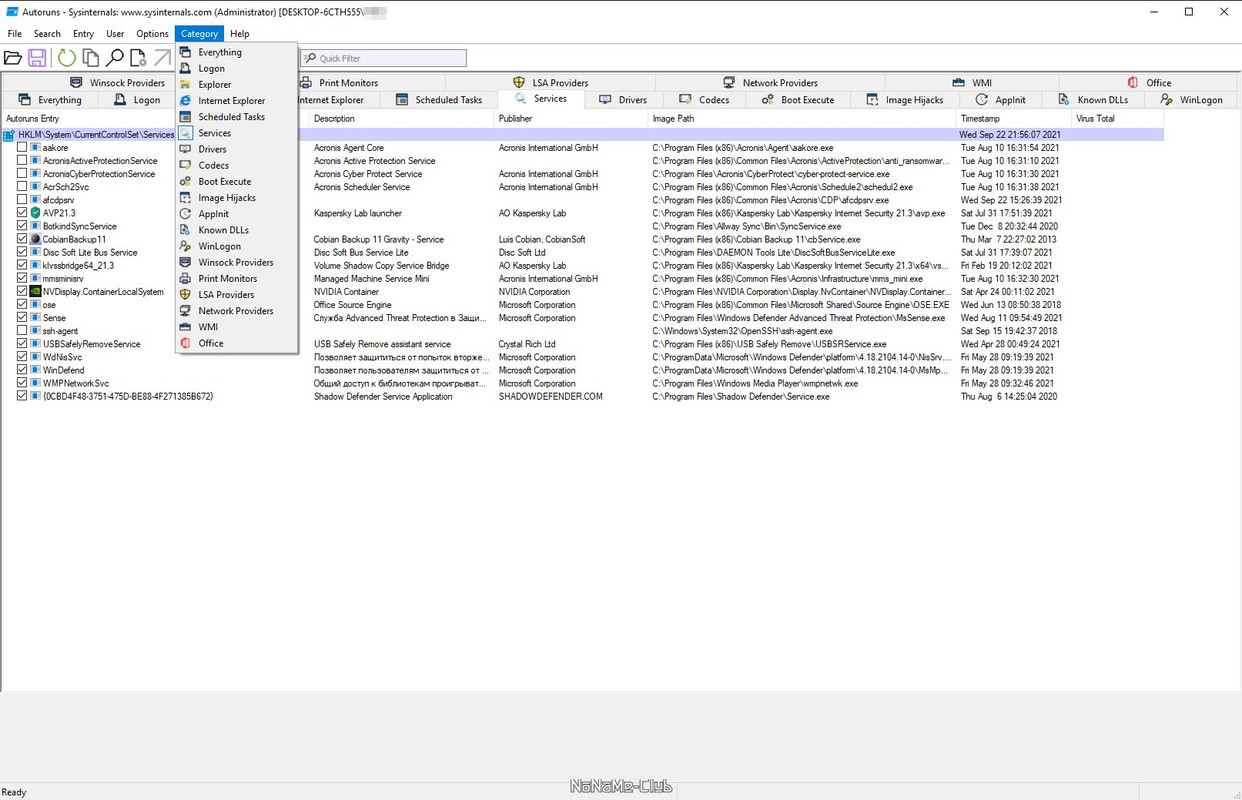
· AutoRuns can be configured to display other locations, such as Explorer Shell Extensions, Toolbars, Browser Helper Objects, Winlogon Notifications, Autostart Services, and many others. Programs, loadable modules, drivers, system services, scheduled tasks, Winlogon are displayed. The utility can show the properties of any object, paths and launch parameters, as well as cancel their autostart. With the help of Autoruns, you can not only control the startup of applications, but also disable the startup of any of them. To do this, just uncheck the corresponding box. In addition to configuring the system, using Autoruns, you can track malicious programs that, as a rule, register their keys in the Startup section of the operating system registry.

7.38 MB
System requirements:
Windows 7-10 (x86 /x64)
Torrent AutoRuns 14.02 Portable in detail:
· AutoRuns - a free utility for Microsoft Windows operating systems, developed by Sysinternals, and then acquired by Microsoft Corporation, is capable of managing the startup of programs, services, modules, drivers and other system components. Autoruns displays absolutely everything that will be launched on the computer at the start of the operating system, user registration and other events. Programs, loadable modules, drivers, system services, scheduled tasks, Winlogon are displayed. The utility can show the properties of any object, paths and startup parameters, as well as cancel their autostart, search for startup programs throughout the system or in specified categories (standard "Startup", Windows services, system registry (Run, RunOnce), Windows Explorer and others ).
· AutoRuns checks almost all places from which autorun and autoloading of programs, DLL-libraries, drivers, codecs, applications, sidebar gadgets, services and other system components occurs. Shows which programs are launched during boot or logon, with those programs displayed in the order in which Windows processes them. Such programs can be located in the startup folder or be registered in the registry keys Run, RunOnce and others. By disabling programs or components that you do not use regularly, you can significantly increase the speed of loading the operating system, the speed of access to RAM, and the speed of computing operations. As a result, more stable work and a significant increase in the performance of the operating system.
· AutoRuns can be configured to display other locations, such as Explorer Shell Extensions, Toolbars, Browser Helper Objects, Winlogon Notifications, Autostart Services, and many others. Programs, loadable modules, drivers, system services, scheduled tasks, Winlogon are displayed. The utility can show the properties of any object, paths and launch parameters, as well as cancel their autostart. With the help of Autoruns, you can not only control the startup of applications, but also disable the startup of any of them. To do this, just uncheck the corresponding box. In addition to configuring the system, using Autoruns, you can track malicious programs that, as a rule, register their keys in the Startup section of the operating system registry.