
FreeCommander XE 2026 Build 957 (x64) Multilingual
File size: 22.1 MB
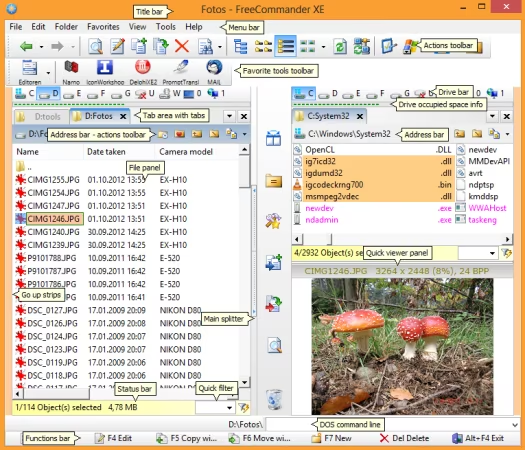
FreeCommander is an easy-to-use alternative to the standard windows file manager. The program helps you with daily work in Windows. Here you can find all the necessary functions to manage your data stock. You can take FreeCommander anywhere - just copy the installation directory on a CD or USB-Stick - and you can evenwork with this program on a foreign computer.
Main features in FreeCommander
Dual-panel technology - horizontal and vertical (one panel possible too)
Tabbed interface
Full access to desktop
Optional tree view for each panel
Built-in file viewer to view files in hex, binary, text or image format
File viewer and thumbnail view inside archives too
Built-in archive handling: ZIP (read, write)
Nested archive handling
Plugins for other archive (RAR, 7z, .)
Plain view - structureless view for files and folders
Linked browsing
Easy access to system folders, control panel, desktop and start menu
Copy, move, delete, rename files and folders (alternatively as Windows or FreeCommander operation)
Drag&drop
File searching (inside archive too)
Searching duplicates
Create and verify MD5 and SHA checksums
Wipe files
Multi rename tool
Paths longer than 255 characters can be opened, copied, moved and renamed
File properties and context menu
Calculation of folder size
Folder comparison
Folder synchronization
Modification of file date and attributes
Folder / program favorites
File filters (regexp possible too) for display and file operations
User defined columns for detailed views
Automatic views
Simple FTP/SFTP client (SFTP only 64 bit)
Access to mobile devices (e.g. smartphones, tablets)
DOS command line
Quick viewer
Quick search
Quick filter
Quick starter
Desktop snapshots
All keyboard shortcuts are definable
Flexible configuration of almost all features
Color schemes
Multiple language support
Whats New
Bug fix: Custom column profiles editor does not work properly if using quick filter for Windows columns
Bug fix: Tree option "Follow location changes in the active panel" is broken if left panel is active
Bug fix: The Message 'The program runs on Windows 10 and later versions' is not showed on Windows 7
Bug fix: Open Favorites from main menu does not work if main menu is in the title bar
Bug fix: Loading Layout from main menu does not work if main menu is in the title bar
Bug fix: Open tab group from main menu does not work if main menu is in the title bar
Bug fix: Setting predefined filter from main menu does not work if main menu is in the title bar
Bug fix: Menu checked items have no checkmark if main menu is in the title bar
Bug fix: Showing file or folder tooltip is broken
Bug fix: Hide/show main menu function is broken
System Requirements: Windows Vista, Windows 7, Windows 8, Windows 10, Windows 11 - 64 Bit
HOMEPAGE
DOWNLOAD