

The two features combined can automate some of your writing duties.
What you need to know
- Months after their availability on G Suite, Autocorrect and Smart Compose for Google Docs are finally making their way to G Suite for Education and Nonprofits.
- Autocorrect automatically correct any spelling and grammatical errors in your writing.
- Smart Compose, meanwhile, uses machine learning to suggest the rest of the sentence based on what you've written.
It's been over six months since Google first started testing and over four months since the feature was made widely available to G Suite users in general, but the company has finally .
First revealed for Gmail, Smart Compose uses machine learning for automatic sentence completion based on the current phrase you're typing in. The feature, Google says, is aimed at 'cutting back on repetitive writing while reducing the chance of spelling and grammatical errors. '
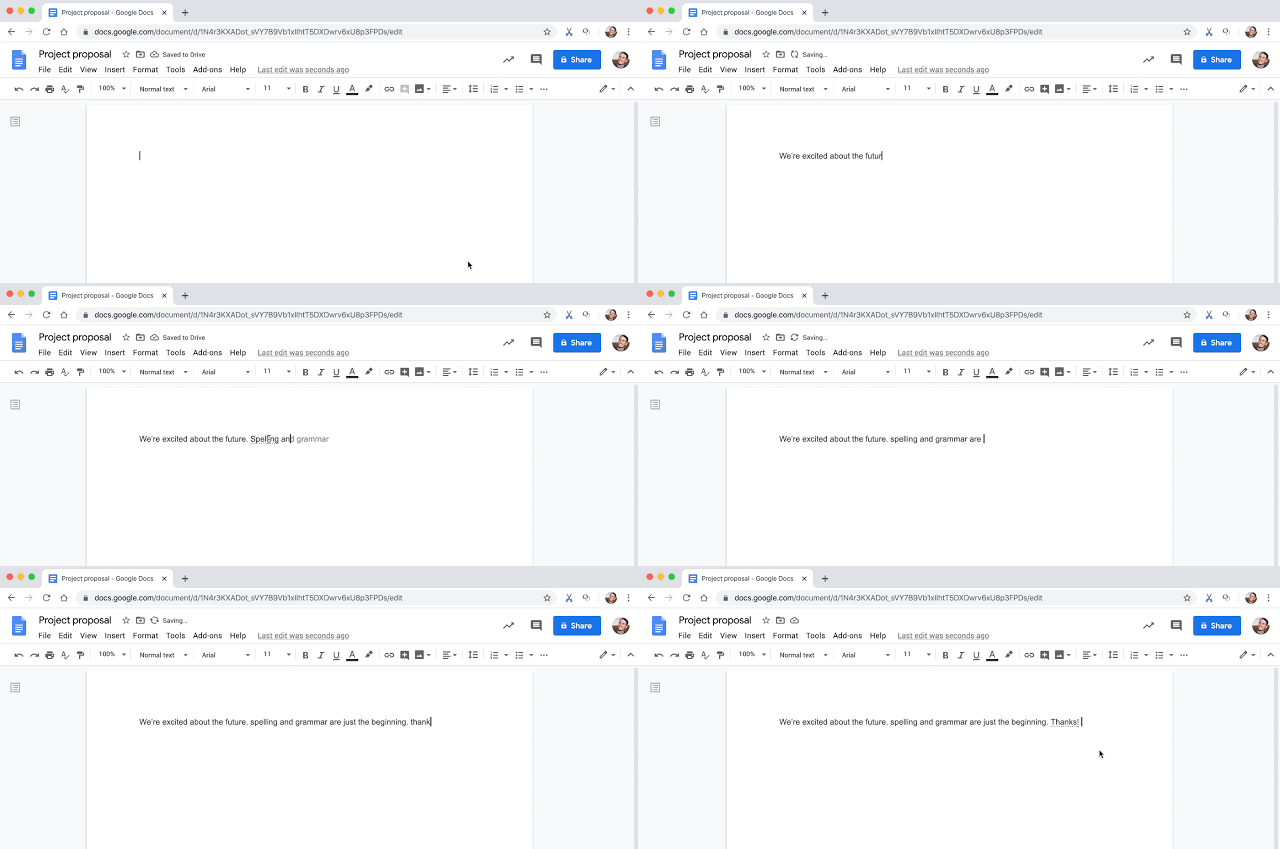
Autocorrect, meanwhile, is a slightly less revolutionary but still a very welcome addition to Google Docs and provides automated corrections for any spelling or grammatical errors you've made. Think Grammarly (or ), but made specially for Google Docs. The corrected text will be underlined, with the option to revert the change, exactly like how Grammarly works.
Both features will be on by default, and the rollout is expected to be complete by June 30. Admin controls to turn off the features are, unfortunately, not available at launch (though end users can always turn them off individually), but Google is planning on adding that functionality by the start of the 2020/2021 academic year.