

The newly released and come with a newer interface which also includes a new, Google Pixel-like app drawer. Apart from allowing you open the app drawer by swiping up or down on the home screen, the new launcher also allows hiding apps.
Of course, there’s an option to completely secure apps and files using the feature on both these smartphones (similar to the and the ), but if you want to hide apps or games for a short time, hiding apps is a good idea.
So, here’s how you can hide apps or games in the Galaxy S8 or S8+’s app launcher:
Step 1: Open the app drawer by swiping up or down from the home screen. Select the options menu by touching the three dots icon situated on the top right corner of the screen.

Step 2: Select Settings.

Step 3: Select the Hide Apps option.
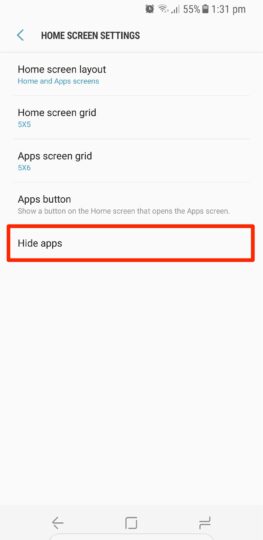
Step 4: You’ll now be shown the entire list of apps that are installed on your phone. Select all the apps or games that you want to hide, and hit Apply. Voila!
Note: When you hide apps, their respective shortcuts will be removed from the home screen as well, if you had placed them earlier. You can unhide those apps using the same process and deselect the apps that you hid. After unhiding the apps, you have to manually place their shortcuts on the home screen once again.
If you’ve got yourself a new Galaxy S8 or S8+, you should .
Of course, there’s an option to completely secure apps and files using the feature on both these smartphones (similar to the and the ), but if you want to hide apps or games for a short time, hiding apps is a good idea.
So, here’s how you can hide apps or games in the Galaxy S8 or S8+’s app launcher:
Step 1: Open the app drawer by swiping up or down from the home screen. Select the options menu by touching the three dots icon situated on the top right corner of the screen.
Step 2: Select Settings.
Step 3: Select the Hide Apps option.
Step 4: You’ll now be shown the entire list of apps that are installed on your phone. Select all the apps or games that you want to hide, and hit Apply. Voila!
Note: When you hide apps, their respective shortcuts will be removed from the home screen as well, if you had placed them earlier. You can unhide those apps using the same process and deselect the apps that you hid. After unhiding the apps, you have to manually place their shortcuts on the home screen once again.
If you’ve got yourself a new Galaxy S8 or S8+, you should .