

Joystiq
Joystiq News
Explore tab can feel like the Wild West at times. The feed shows recommended posts from accounts you don't follow, but you never really know what you'll see. It might feature a photo, video or that's potentially distressing — even if it doesn't break the platform's rules.
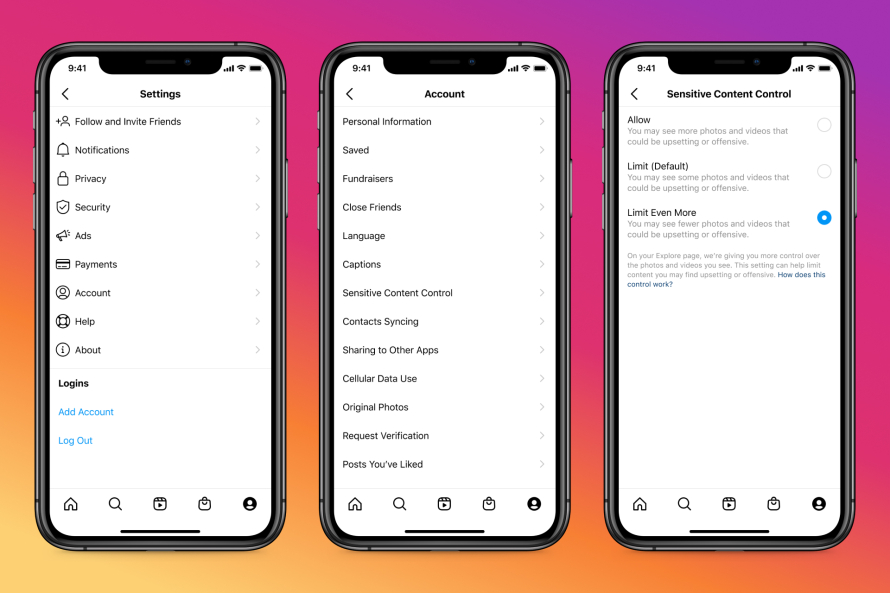
To mitigate that, Instagram is a Sensitive Content Control option. The aim is to let you choose how much sensitive content you see in the Explore feed, and giving you more control over how you use Instagram. You can adjust the filter by going to the app's Settings, then tapping Account and Sensitive Content Control.
You'll be able to decrease the number of sensitive posts in the Explore feed by selecting "Limit Even More." You can also turn the filter off by changing from the default "Limit" option to "Allow" (that choice won't be available to users aged under 18, however). You can change the setting at any time.
Instagram
Among the types of content Instagram are depictions of violence (though it removes graphic violence). "Sexually explicit or suggestive" posts are also deemed sensitive, such as photos or videos showing someone in transparent clothing — the platform doesn't allow posts that contain nudity or sexual activity.
If you have the sensitive content filter on, Instagram may also stop posts that promote the use of some regulated items from appearing in the Explore feed. Those products include adult products and services, tobacco and vaping products and pharmaceutical drugs. Instagram takes down most content related to selling or trading .
Console Bang News!
To mitigate that, Instagram is a Sensitive Content Control option. The aim is to let you choose how much sensitive content you see in the Explore feed, and giving you more control over how you use Instagram. You can adjust the filter by going to the app's Settings, then tapping Account and Sensitive Content Control.
You'll be able to decrease the number of sensitive posts in the Explore feed by selecting "Limit Even More." You can also turn the filter off by changing from the default "Limit" option to "Allow" (that choice won't be available to users aged under 18, however). You can change the setting at any time.
Among the types of content Instagram are depictions of violence (though it removes graphic violence). "Sexually explicit or suggestive" posts are also deemed sensitive, such as photos or videos showing someone in transparent clothing — the platform doesn't allow posts that contain nudity or sexual activity.
If you have the sensitive content filter on, Instagram may also stop posts that promote the use of some regulated items from appearing in the Explore feed. Those products include adult products and services, tobacco and vaping products and pharmaceutical drugs. Instagram takes down most content related to selling or trading .
Console Bang News!