
QUICK INFO: File size: 14.2 MB
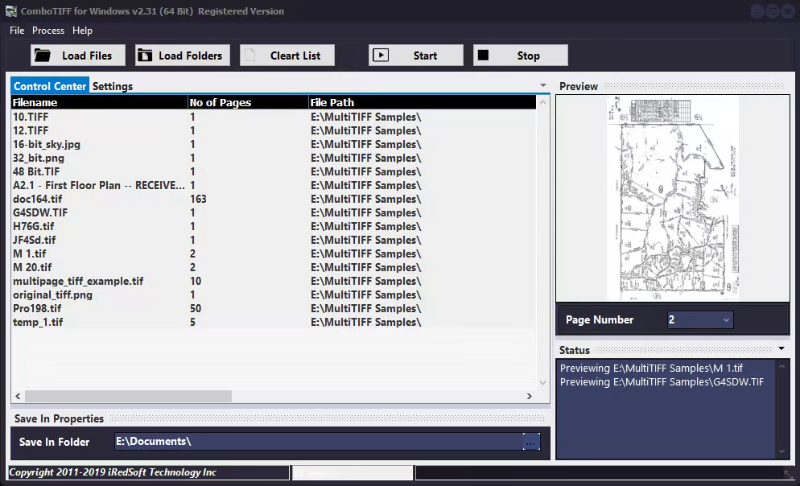
DESCRIPTION: ComboTIFF for Windows is a Batch TIFF Tool which allows you to.
Merge JPG, PNG and TIFF images into a single Multipage TIFF document
Combine several Multipage TIFFs into a single Multipage TIFF document
Extract pages from a Multipage TIFF documents into single page JPG, PNG and TIFF
Downsize JPG, PNG and TIFF files and pages by Pixel, Percentage and Ratio
Convert JPG, PNG and TIFF images between the formats
Multi-Page TIFF Files are ideal for businesses who are required to keep documents. You could store relevant documents inside a single Multi-Page TIFF file for easy storage. You no longer need to go search through file folders to see if any documents are missing. When it is time to use the documents, you can use ComboTIFF for Windows to extract the individual pages and select the pages you want to print or convert to PDF. The choice is yours.
ComboTIFF for Windows can handle Black and White, Grayscale and Color images all in a single Multi-page TIFF file.
Whats New
Updates: official site does not provide any info about changes in this version
System Requirements: Windows 10 (64 Bit), Windows 8 (64 Bit), Windows Server 2012 (64 Bit) and Windows Server 2016 (64 Bit)
⋆- - - - -☽───⛧ ⤝❖⤞ ⛧───☾ - - - -⋆
IRedSoft Combo TIFF 2.97 (x64) (15 MB)
11-07-2026 |
 21:48 UTC
RapidGator
NitroFlare