

Joystiq
Joystiq News
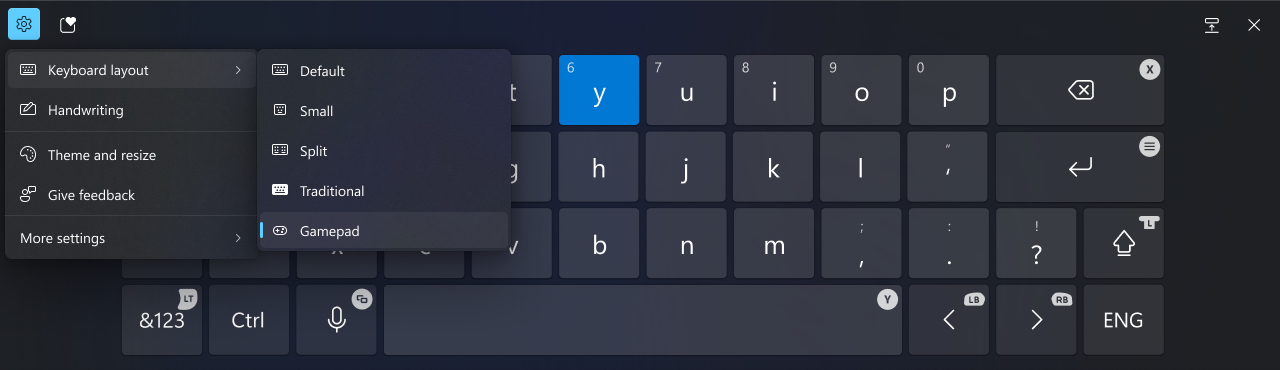
Microsoft has been working on improving small-screen and touchscreen input, focusing on making it more accessible to Windows handheld console users (think the ). Typing with a controller isn’t convenient, but Microsoft's latest introduced a new onscreen keyboard layout that’s a lot easier to use with an Xbox controller, or the controls on a portable gaming PC.
Windows
The new layout isn’t confined to moving cursors and selecting specific keys anymore. For example, the X button can be used to backspace, while the Y button is a space bar. The left trigger opens the symbols and numbers page as well. It’s almost like a mobile keyboard but optimized for Xbox controller usage. Most importantly, all keys are vertically aligned, making navigating the keyboard easier.
The target users for this change include Windows-powered handheld users and PC gamers who prefer to stick to an Xbox controller while playing games. This latest update follows another change Microsoft made a few weeks ago that makes the Windows Game Bar easier to use on handhelds.
This article originally appeared on Engadget at
Console Bang News!
Windows
The new layout isn’t confined to moving cursors and selecting specific keys anymore. For example, the X button can be used to backspace, while the Y button is a space bar. The left trigger opens the symbols and numbers page as well. It’s almost like a mobile keyboard but optimized for Xbox controller usage. Most importantly, all keys are vertically aligned, making navigating the keyboard easier.
The target users for this change include Windows-powered handheld users and PC gamers who prefer to stick to an Xbox controller while playing games. This latest update follows another change Microsoft made a few weeks ago that makes the Windows Game Bar easier to use on handhelds.
This article originally appeared on Engadget at
Console Bang News!