

Joystiq
Joystiq News
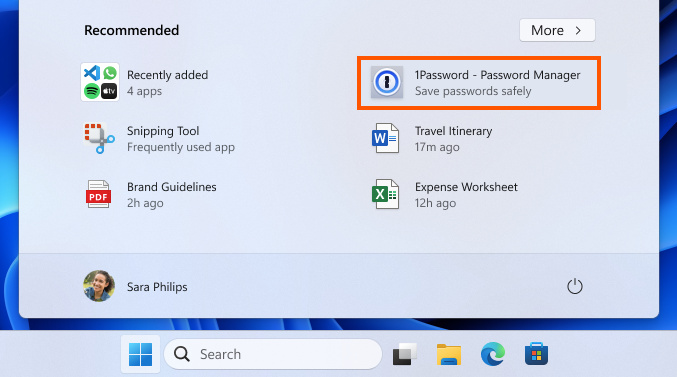
Microsoft is exploring the idea of putting ads in your Start menu. To be specific, it's looking to you can find in the Microsoft Store in the menu's recommended section. I could hear you sighing in defeat if you've used Windows 10 extensively before — the older OS serves ads in the Start menu, as well, and they're also for apps you can download. At the moment, Microsoft will only show ads in this version if you're in the US and a Windows Insider in the Beta Channel. You won't be seeing them if you're not a beta tester or if you're using a device managed by an organization.
Further, you can disable the advertisements altogether. To do so, just go to Personalization under Settings and then toggle off "Show recommendations for tips, app promotions, and more" in the Start section. Like any other Microsoft experiment, it may never reach wider rollout, but you may want to remember the aforementioned steps, since the company does have history of incorporating ads into its desktop platforms. Last year, Microsoft also deployed for its services like OneDrive in the menu that pops up when you click on your profile photo.
Microsoft
This article originally appeared on Engadget at
Console Bang News!
Further, you can disable the advertisements altogether. To do so, just go to Personalization under Settings and then toggle off "Show recommendations for tips, app promotions, and more" in the Start section. Like any other Microsoft experiment, it may never reach wider rollout, but you may want to remember the aforementioned steps, since the company does have history of incorporating ads into its desktop platforms. Last year, Microsoft also deployed for its services like OneDrive in the menu that pops up when you click on your profile photo.
Microsoft
This article originally appeared on Engadget at
Console Bang News!