
Portable mp3DirectCut 2.34 Multilanguage
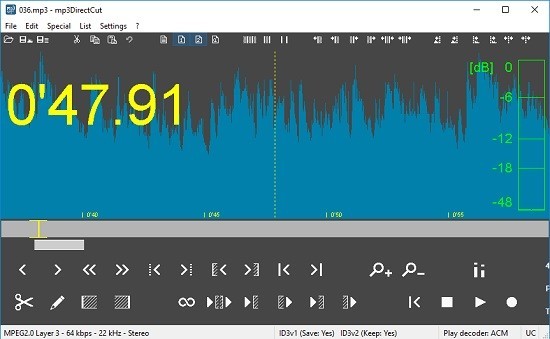 mp3DirectCut portable is a fast and extensive audio editor and recorder for compressed mp3. You can directly cut, copy, paste or change the volume with no need to decompress your files for audio editing. This saves encoding time and preserves the original quality, because nothing will be re-encoded. The built in recorder creates mp3 on the fly from your audio input. Using Cue sheets, pause detection or Auto cue you can easily divide long files.
Supported file extensions and select start and end points
This simple utility opens an audio track and lets you cut it to fit your preferences, and supports aside from MP3s, formats such as MP2, MPA, MUS, AAC and CUE.
After uploading an item, you can view the wave form in the main window, as well as use the mouse to mark the start and end points, yet you should also know that you can input the exact time coordinates in the built-in boxes, for greater accuracy.
Split songs and automatically detect pauses
mp3DirectCut Portable helps you accomplish tasks like adjusting the overall volume, splitting and even copying parts from one song to another.
In addition to that, an entry in the menu bar reveals advanced features which will enable you to automatically cue an audio track, detect pauses and automatically crop an item. You can check for re-syncs, and apply a two-stage fade effect.
Use built-in controls and process multiple files in the same time
Playback controls are also included in the main window, allowing you to play, pause or stop a song at any point, loop a selection or play from the end or start point. You can chose to save the complete audio mix, export the current selection only and even generate CUE sheets for longer audio files.
Batch process is available, enabling you to perform multiple operations with multiple items in the same time, such as cutting them at a user-defined time, fade at a specified position and automatically cue them.
Edit mp3 without re-encoding
Features
Non-destructive cut, copy, paste
Volume change, fade, normalize
MP3 recording with ACM or Lame encoder
Fast MPEG visualisation and easy navigation
Layer 2 support (dvd/dvb audio)
AAC support
Batch processing
Cue Sheet support
Pause detection
Auto cue (track dividing by time values)
Track splitting with filename and tag creation
Trim · Crop · Fast play · Loop play
ID3v1.1 tag editor · ID3v2 tag keeping
VU meter · bitrate visualisation
High speed recorder · Command line usage
Unicode support
Whats New:
Bugs fixed
Natural numerical ordering in batch list
Few more changes

Supported file extensions and select start and end points
This simple utility opens an audio track and lets you cut it to fit your preferences, and supports aside from MP3s, formats such as MP2, MPA, MUS, AAC and CUE.
After uploading an item, you can view the wave form in the main window, as well as use the mouse to mark the start and end points, yet you should also know that you can input the exact time coordinates in the built-in boxes, for greater accuracy.
Split songs and automatically detect pauses
mp3DirectCut Portable helps you accomplish tasks like adjusting the overall volume, splitting and even copying parts from one song to another.
In addition to that, an entry in the menu bar reveals advanced features which will enable you to automatically cue an audio track, detect pauses and automatically crop an item. You can check for re-syncs, and apply a two-stage fade effect.
Use built-in controls and process multiple files in the same time
Playback controls are also included in the main window, allowing you to play, pause or stop a song at any point, loop a selection or play from the end or start point. You can chose to save the complete audio mix, export the current selection only and even generate CUE sheets for longer audio files.
Batch process is available, enabling you to perform multiple operations with multiple items in the same time, such as cutting them at a user-defined time, fade at a specified position and automatically cue them.
Edit mp3 without re-encoding
Features
Non-destructive cut, copy, paste
Volume change, fade, normalize
MP3 recording with ACM or Lame encoder
Fast MPEG visualisation and easy navigation
Layer 2 support (dvd/dvb audio)
AAC support
Batch processing
Cue Sheet support
Pause detection
Auto cue (track dividing by time values)
Track splitting with filename and tag creation
Trim · Crop · Fast play · Loop play
ID3v1.1 tag editor · ID3v2 tag keeping
VU meter · bitrate visualisation
High speed recorder · Command line usage
Unicode support
Whats New:
Bugs fixed
Natural numerical ordering in batch list
Few more changes