

Samsung for the and in the US less than 24 hours back, but it looks like the update carried a major bug. Beta participants have taken to Reddit to reveal that their Galaxy S8 isn’t getting a network signal on the second beta, and Samsung has officially halted the update so it can work on a fix.
Second Galaxy S8 Android 8.0 Oreo beta pulled in the US
This issue affects Sprint, T-Mobile, and unlocked Galaxy S8s, with users complaining about the phone app repeatedly crashing after the update. Some of those users say clearing data for the phone app fixes the issue, but it crops right back after a restart. A factory reset isn’t helping either, and that might be why Samsung isn’t pushing out the update at this time. The company will hopefully find a solution quickly, but right now, there’s no mention of when the update will start rolling out again.
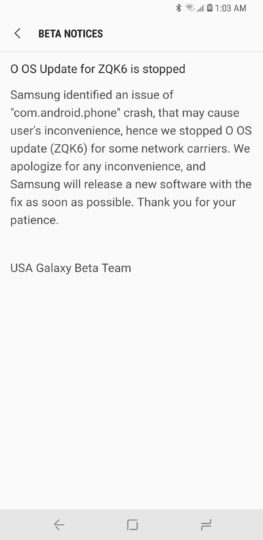
With beta software, and the reason why it shouldn’t be used as a daily driver. Thankfully, the network connectivity problem seems to be limited to the US models, so Samsung is still gathering information and working towards Android 8.0 Oreo’s official release. Here’s hoping the fix is a simple one and rolled out as quickly as possible, instead of being reserved for the third beta. We’ll be sure to let you know either way, so stay tuned to SamMobile.
Oh, and for the temporary solution of clearing data for the phone app (which may or may not work for you), here’s what you would need to do:
Have you faced this issue running the latest Android Oreo beta on your Galaxy S8 or Galaxy S8+?
The post appeared first on .
Second Galaxy S8 Android 8.0 Oreo beta pulled in the US
This issue affects Sprint, T-Mobile, and unlocked Galaxy S8s, with users complaining about the phone app repeatedly crashing after the update. Some of those users say clearing data for the phone app fixes the issue, but it crops right back after a restart. A factory reset isn’t helping either, and that might be why Samsung isn’t pushing out the update at this time. The company will hopefully find a solution quickly, but right now, there’s no mention of when the update will start rolling out again.
With beta software, and the reason why it shouldn’t be used as a daily driver. Thankfully, the network connectivity problem seems to be limited to the US models, so Samsung is still gathering information and working towards Android 8.0 Oreo’s official release. Here’s hoping the fix is a simple one and rolled out as quickly as possible, instead of being reserved for the third beta. We’ll be sure to let you know either way, so stay tuned to SamMobile.
Oh, and for the temporary solution of clearing data for the phone app (which may or may not work for you), here’s what you would need to do:
- Go to the phone’s settings, and then tap the Apps option.
- Here, tap the three-dot button and select the Show system apps option.
- Scroll down and tap on the Phone app.
- Here, select Storage, followed by the Clear data button.
- Go back to the apps list and repeat step 4 for each instance of the Phone app.
- Restart your phone and see if your phone gets cell reception.
Have you faced this issue running the latest Android Oreo beta on your Galaxy S8 or Galaxy S8+?
The post appeared first on .