
QUICK INFO: File Size: 7.7 MB
DESCRIPTION: Go deeper into every USB-C port and cable
The free app tells you what your cable can do. Pro shows you what's bottlenecking it: Negotiation Diagnostics breaks down every link by Mac port, cable, and device with the weak link highlighted, plus live power metering, PD contract inspection, and signal-level diagnostics straight from IOKit.
Real data from real ports
Every reading comes straight from IOKit. No estimates, no guesswork.
What Pro unlocks
Everything in the free app, plus deep diagnostics that read directly from IOKit, no extra software, no root access needed.
Negotiation Diagnostics
Per connection, see what the Mac port, the cable, and the device each support against what was actually negotiated, side by side, with the weak link highlighted. Includes a cross-check of the cable's e-marker against the Thunderbolt controller, so a cable that under-reports itself is caught. Pro screens open in place inside the popover, with an optional detach into their own window so a screen can stay open while you swap cables.
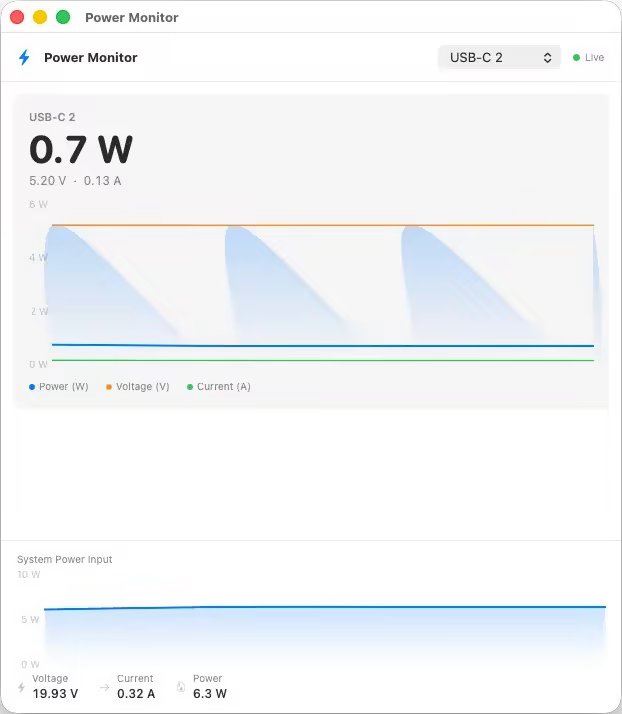
Live power metering
Real-time watts, amps, and voltage per port. Updates every 2 seconds from the battery controller. See exactly what your cable is delivering right now.
PD contract inspector
See the full negotiated power delivery contract: active voltage and current, all available PDOs decoded with type-aware formatting, and any capability mismatches flagged.
Cable resistance estimation
Multi-point regression across power samples estimates cable resistance in milliohms. Useful for spotting worn or marginal cables before they cause problems.
Port health counters
Lifetime attach/detach events, hard resets, shorts, I2C errors, role swap stats, and FET failures per port. See how a port has been treated over its lifetime.
PD event trace
Decoded protocol-level event history per port. See attach/detach sequences, contract negotiation steps, and hard reset events as they happen.
DP Alt Mode details
Lane count, link rate, tunneled vs native, full EDID with monitor model, manufacturer, and year for any display connected over USB-C.
Raw VDO identity
Full Discover Identity VDOs from SOP and SOP', the cable plug itself. Go beyond the e-marker summary to the raw fields your cable's controller actually reported.
Liquid detection
LDCM sensor status per port. See whether the liquid contact indicator has been triggered on any port, useful for diagnosing intermittent charging faults.
Power monitor window
Dedicated SwiftUI window with live Charts showing watts and voltage over time per port. Pin it while you test a charger or cable under load.
CLI monitor mode
whatcable --monitor streams live power and cable state to your terminal. Pipe it, script it, log it.
Widget power sparkline
Desktop widget shows a live power chart alongside cable status. Glance at your desktop and see charging trends without opening anything.
CC advertisement level
Rp current advertisement level with inferred CC line voltage. See what current level your port's pull-up resistor is advertising to attached devices.
What's New
official site does not provide any info about changes in this version.
System Requirements
• macOS 14 or later
• Apple Silicon or Intel Core processor
⋆- - - - -☽───⛧ ⤝❖⤞ ⛧───☾ - - - -⋆
WhatCable Pro 0.13.4 MacOS (7 MB)
NitroFlare
RapidGator