
Yamicsoft Windows 11 Manager 1.0.3 Final Portable
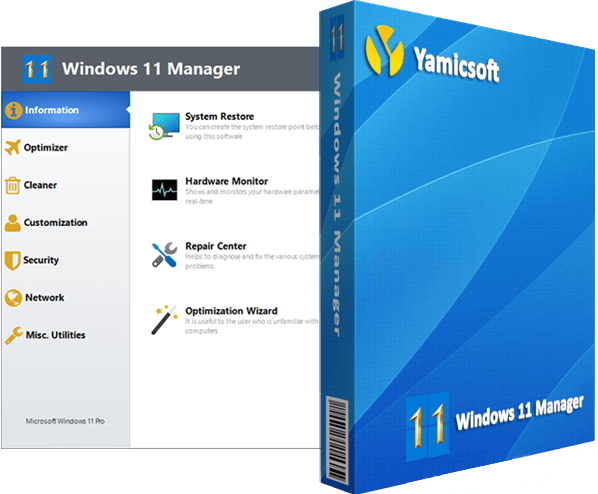
Yamicsoft Windows 11 Manager is an all-in-one optimizer, a complete solution for excellent optimization, thoughtful tuning and high-quality cleaning of Windows 11. The program includes more than 30 utilities that improve and speed up the system, increase its stability, stability and security. Windows 11 Manager allows you to access several hundred hidden options for configuring the system, provides detailed information about all computer components and running processes, and helps you personalize your copy of Windows.
Additional Information:
» Information
Receives detailed information about the system and all its devices; helps you find the installation key for Windows, Office products; shows all the detailed information about running processes and subprocesses on your machine; Windows 11 Manager offers automatic cleaning of your system with just one click.
»Optimizer
Adjust your system in order to increase the speed of starting and closing windows; tune your hardware to improve system performance; Optimize Task Schedule is used to eliminate unnecessary system tasks.
» Cleaner
Find out which files or folders are taking up space on your disk; find and clean up unnecessary files to increase hard disk space; Duplicate Files Finder can scan your computer for files with the same size, name and modification time; Registry Cleaner will quickly check your system registry and fix entries with incorrect links, automatically removing incorrect entries; Registry Defrag repairs and renumbers your system registry to reduce application response times and registry access times.
» Individual setting
Check what starts when you turn on Windows; create shortcut icons on the control panel using the Jump List quick launch tool; customize the Windows 11 boot menu; edit context menus with the right mouse click; customize your desktop, menus, control panel and alert settings; customize the look of your system.
» Protection
You can improve the settings of the desktop, menus, security when logging in, as well as a huge number of hidden features of the system, disable system updates and error reporting; close and restrict access to disks, determine which applications cannot run on your computer; encrypt / decrypt files and open them for general access, change the location of system folders; Privacy Protector is able to ensure your privacy, eliminating all traces of your activity; generate many random passwords in one go.
» Network
Optimize the speed of your internet connection, configure all public objects; adjust your Internet Explorer with ease.
» Mixed utilities
Browse the collection of Windows utilities; split and combine any files.
Features of the program:
• shows detailed information about all computer components, hardware, user system and office products;
• displays running processes and open threads;
• has options to optimize and customize the parameters of Windows;
• has built-in modules for cleaning the registry, hard drive, etc .;
• increases the speed of loading and shutting down the PC;
• allows to increase the performance of running multimedia programs;
• configures network connections;
• allows you to customize the appearance of the interface and some functions for managing the desktop, menus, services and services, Internet Explorer, etc.
Using Windows Manager you can:
• Speed up system startup and shutdown
• Search for unnecessary and duplicate files and delete them
• Fix errors in the registry
• Defragment the registry
• Disable system updates and error reporting
• You can change the boot screen
• Change the contents of context menus
• Set automatic change of wallpaper in the background, set up notification messages ...
Windows 11 Manager v1.0.2 released!
• Fix some bugs.
• Add some tweaks.
• Add the Security Lock, and you can lock apps, folders and other some features.

Yamicsoft Windows 11 Manager is an all-in-one optimizer, a complete solution for excellent optimization, thoughtful tuning and high-quality cleaning of Windows 11. The program includes more than 30 utilities that improve and speed up the system, increase its stability, stability and security. Windows 11 Manager allows you to access several hundred hidden options for configuring the system, provides detailed information about all computer components and running processes, and helps you personalize your copy of Windows.
Additional Information:
» Information
Receives detailed information about the system and all its devices; helps you find the installation key for Windows, Office products; shows all the detailed information about running processes and subprocesses on your machine; Windows 11 Manager offers automatic cleaning of your system with just one click.
»Optimizer
Adjust your system in order to increase the speed of starting and closing windows; tune your hardware to improve system performance; Optimize Task Schedule is used to eliminate unnecessary system tasks.
» Cleaner
Find out which files or folders are taking up space on your disk; find and clean up unnecessary files to increase hard disk space; Duplicate Files Finder can scan your computer for files with the same size, name and modification time; Registry Cleaner will quickly check your system registry and fix entries with incorrect links, automatically removing incorrect entries; Registry Defrag repairs and renumbers your system registry to reduce application response times and registry access times.
» Individual setting
Check what starts when you turn on Windows; create shortcut icons on the control panel using the Jump List quick launch tool; customize the Windows 11 boot menu; edit context menus with the right mouse click; customize your desktop, menus, control panel and alert settings; customize the look of your system.
» Protection
You can improve the settings of the desktop, menus, security when logging in, as well as a huge number of hidden features of the system, disable system updates and error reporting; close and restrict access to disks, determine which applications cannot run on your computer; encrypt / decrypt files and open them for general access, change the location of system folders; Privacy Protector is able to ensure your privacy, eliminating all traces of your activity; generate many random passwords in one go.
» Network
Optimize the speed of your internet connection, configure all public objects; adjust your Internet Explorer with ease.
» Mixed utilities
Browse the collection of Windows utilities; split and combine any files.
Features of the program:
• shows detailed information about all computer components, hardware, user system and office products;
• displays running processes and open threads;
• has options to optimize and customize the parameters of Windows;
• has built-in modules for cleaning the registry, hard drive, etc .;
• increases the speed of loading and shutting down the PC;
• allows to increase the performance of running multimedia programs;
• configures network connections;
• allows you to customize the appearance of the interface and some functions for managing the desktop, menus, services and services, Internet Explorer, etc.
Using Windows Manager you can:
• Speed up system startup and shutdown
• Search for unnecessary and duplicate files and delete them
• Fix errors in the registry
• Defragment the registry
• Disable system updates and error reporting
• You can change the boot screen
• Change the contents of context menus
• Set automatic change of wallpaper in the background, set up notification messages ...
Windows 11 Manager v1.0.2 released!
• Fix some bugs.
• Add some tweaks.
• Add the Security Lock, and you can lock apps, folders and other some features.