

This back to school season, inspire creativity, and run at maximum efficiency with the latest features and tools from . We’re rolling out new features in Classroom and G Suite for Education, AR and VR on Chromebooks, Google Earth and Science Journal updates, and new trainings from the Teacher Center and Applied Digital Skills.
New tools in Classroom and G Suite
Google Classroom is getting its yet. We’ve added a Classwork page to help teachers and students stay more organized. With Classwork, teachers can easily group assignments into units or modules, and reorder work to match their class sequence. We’re also introducing a new grading tool, which lets educators quickly toggle between student submissions when grading, and save commonly used feedback. The tool improves the grading workflow, so that educators have more time to spend personalizing feedback. Finally, we’ve made it easier to setup classes and manage information. Read more , and check out the for full details.
In addition to using a Learning Management System (LMS), many schools use G Suite to collaborate. Until now, there hasn’t been an easy way to integrate G Suite with many LMSs. That’s why we introduced in July, a free toolkit that allows instructors to use Google Docs and Drive to collect assignments, give faster and richer feedback to students, and share course materials within the LMS they’re already using. It’s built using the so it's easy to set up and works with all LMSs that support LTI. If your institution uses G Suite for Education, you can get started by .
We heard from educators and students it can be challenging to format in Google Docs when writing and assigning papers. That’s why we’re sharing focused on margins and indentations to improve the overall writing experience, especially when making MLA style citations. Now, you can use hanging indents and set specific indentations using a dialog box. Be on the lookout for customizable header and footer margins, and a vertical ruler coming to Docs this fall.

Bring learning to life with Daydream, Google Earth, and Science Journal
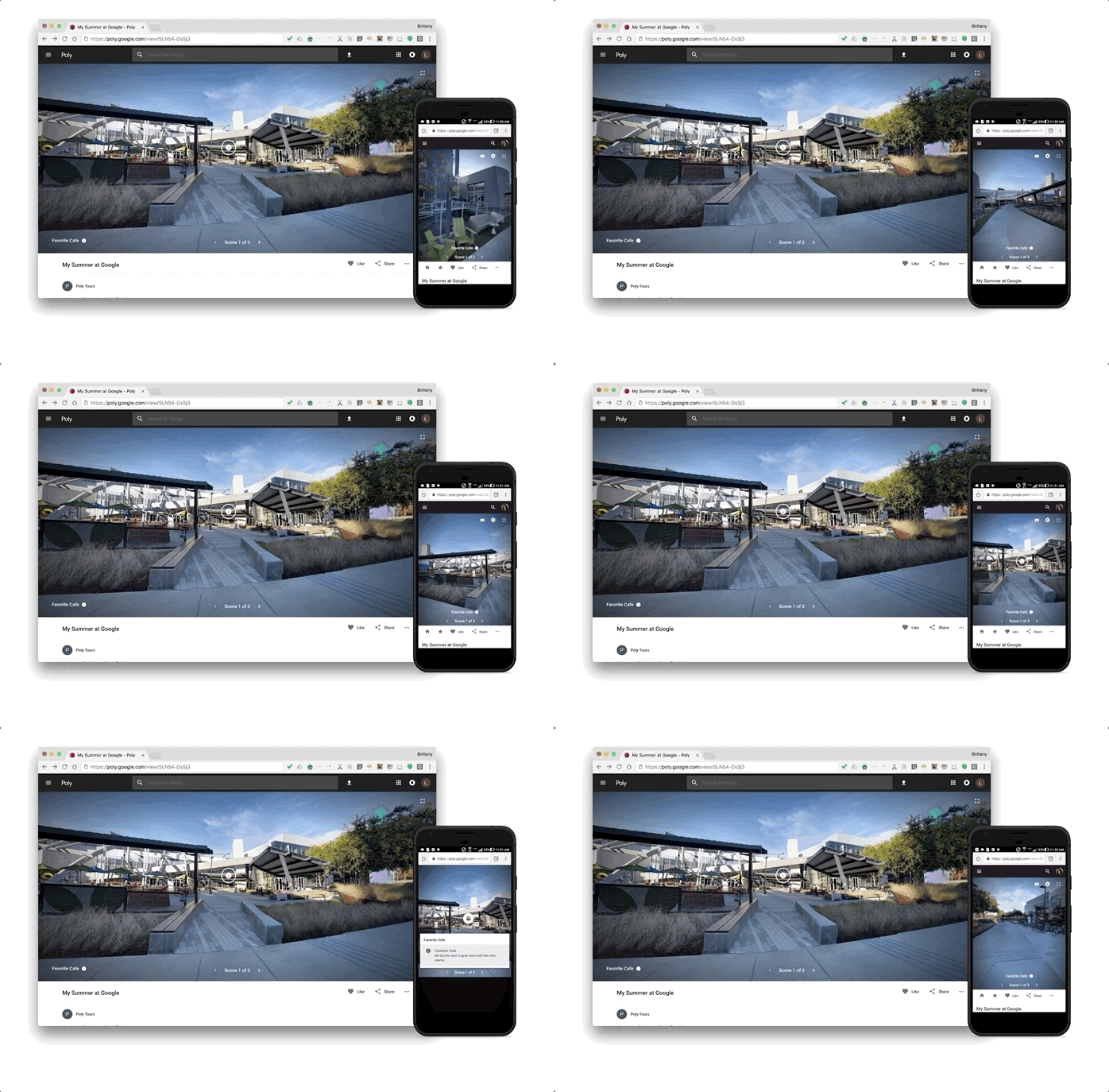
Your student explorers can show and tell in 360-degree VR, because now allows photos taken on your own device with the free app (available on Android and iOS) to be added to tours. And coming soon, you’ll also be able to add photos to tours which can be easily taken from any . Have curious students wanting to explore ancient ruins, swim in the Indian Ocean, and save the endangered elephants in Africa? Coming this fall, will run on the so students can experience and other AR apps directly on their tablets.
Adventures continue with 30 newly released , in 8 languages from Google Earth. Students and teachers can explore Mars, the world’s oceans and protected environments with NASA, the Monterey Bay Aquarium, The Ocean Agency, and the National Geographic Society.
Student scientists wanting to test hypotheses can use the , which has been updated with new content, including activities from the band OK Go in the . Coming this winter, the new Google Drive integration will also allow students to conduct, document and access science experiments from any device running the free Science Journal app.
Innovative training with the Teacher Center and Applied Digital Skills
We heard that first time G Suite users and educators looking for a refresh found our #FirstDayofClassroom resources to be helpful, and now we’re expanding to include our other products, starting with Google Forms. Our new in the updated Teacher Center are curated video trainings made by educators, for educators, with actionable steps to get started with G Suite for Education. We want to hear from you as we add more trainings and products, so submit your .
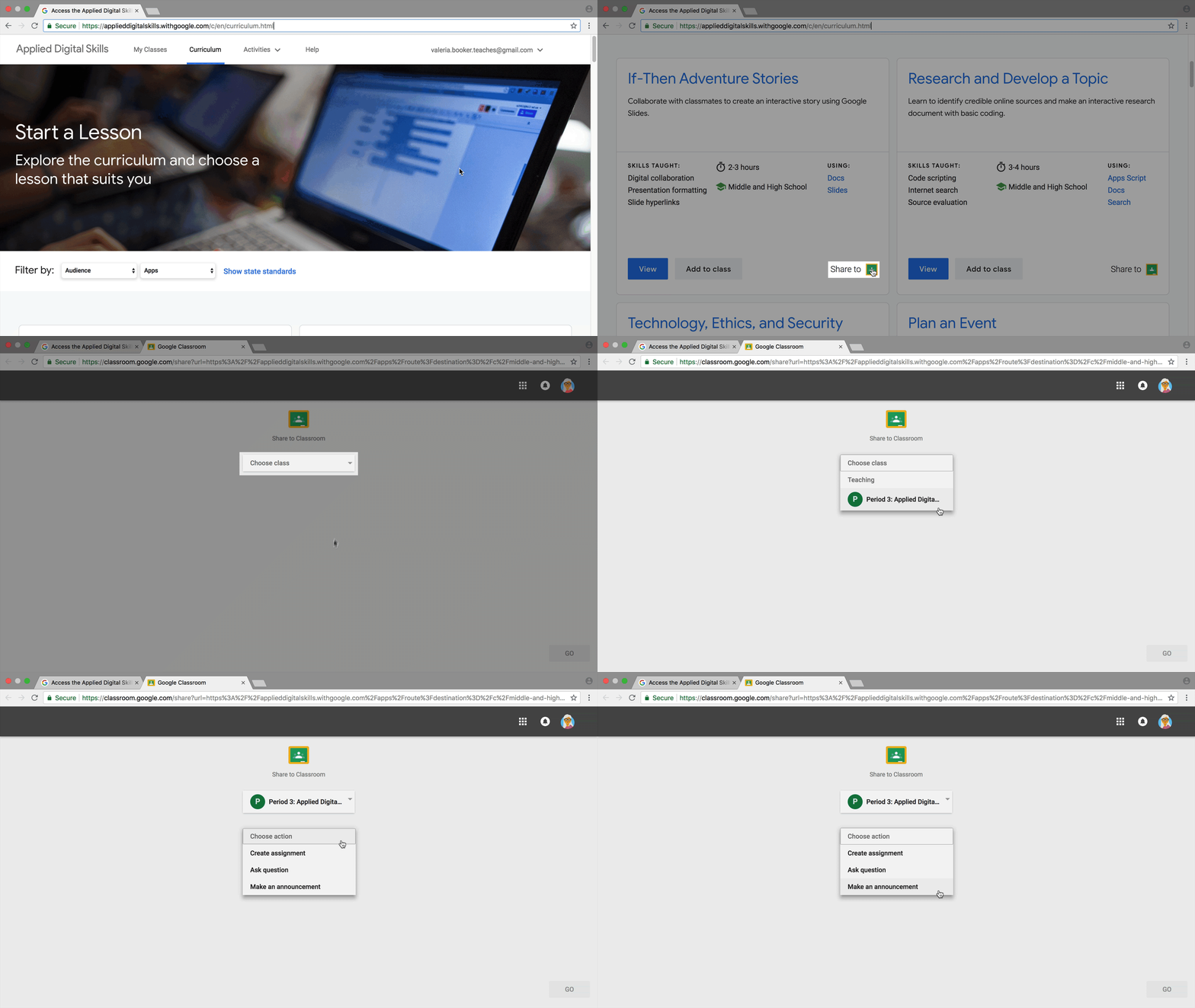
Based on one of the top requests from teachers last year, the free video-based curriculum site now enables instructors to assign lessons through Classroom. Students can share in the excitement too, with the ability to track their classes, lessons and the last video they viewed in the new Student Dashboard.
Previously announced in June, at
We shared that the first tablet running the same reliable operating system as Chromebooks, the , is now shipping, and also announced a new affordable, no charging or pairing required which will soon be available. Educators will soon have the ability to create a Quiz in Google Forms from Classroom and enable for distraction free testing, only on managed Chromebooks. And for all of the admins out there, make sure to check out and to our revamped release notes.
From all of us at Google for Education, welcome back to school. We can’t wait to see what you accomplish during this upcoming school year. Be sure to follow along on Google for Education’s and pages for more information and resources for you and your students.

New tools in Classroom and G Suite
Google Classroom is getting its yet. We’ve added a Classwork page to help teachers and students stay more organized. With Classwork, teachers can easily group assignments into units or modules, and reorder work to match their class sequence. We’re also introducing a new grading tool, which lets educators quickly toggle between student submissions when grading, and save commonly used feedback. The tool improves the grading workflow, so that educators have more time to spend personalizing feedback. Finally, we’ve made it easier to setup classes and manage information. Read more , and check out the for full details.
In addition to using a Learning Management System (LMS), many schools use G Suite to collaborate. Until now, there hasn’t been an easy way to integrate G Suite with many LMSs. That’s why we introduced in July, a free toolkit that allows instructors to use Google Docs and Drive to collect assignments, give faster and richer feedback to students, and share course materials within the LMS they’re already using. It’s built using the so it's easy to set up and works with all LMSs that support LTI. If your institution uses G Suite for Education, you can get started by .
We heard from educators and students it can be challenging to format in Google Docs when writing and assigning papers. That’s why we’re sharing focused on margins and indentations to improve the overall writing experience, especially when making MLA style citations. Now, you can use hanging indents and set specific indentations using a dialog box. Be on the lookout for customizable header and footer margins, and a vertical ruler coming to Docs this fall.
Bring learning to life with Daydream, Google Earth, and Science Journal
Your student explorers can show and tell in 360-degree VR, because now allows photos taken on your own device with the free app (available on Android and iOS) to be added to tours. And coming soon, you’ll also be able to add photos to tours which can be easily taken from any . Have curious students wanting to explore ancient ruins, swim in the Indian Ocean, and save the endangered elephants in Africa? Coming this fall, will run on the so students can experience and other AR apps directly on their tablets.
Adventures continue with 30 newly released , in 8 languages from Google Earth. Students and teachers can explore Mars, the world’s oceans and protected environments with NASA, the Monterey Bay Aquarium, The Ocean Agency, and the National Geographic Society.
Student scientists wanting to test hypotheses can use the , which has been updated with new content, including activities from the band OK Go in the . Coming this winter, the new Google Drive integration will also allow students to conduct, document and access science experiments from any device running the free Science Journal app.
Innovative training with the Teacher Center and Applied Digital Skills
We heard that first time G Suite users and educators looking for a refresh found our #FirstDayofClassroom resources to be helpful, and now we’re expanding to include our other products, starting with Google Forms. Our new in the updated Teacher Center are curated video trainings made by educators, for educators, with actionable steps to get started with G Suite for Education. We want to hear from you as we add more trainings and products, so submit your .
Based on one of the top requests from teachers last year, the free video-based curriculum site now enables instructors to assign lessons through Classroom. Students can share in the excitement too, with the ability to track their classes, lessons and the last video they viewed in the new Student Dashboard.
Previously announced in June, at
We shared that the first tablet running the same reliable operating system as Chromebooks, the , is now shipping, and also announced a new affordable, no charging or pairing required which will soon be available. Educators will soon have the ability to create a Quiz in Google Forms from Classroom and enable for distraction free testing, only on managed Chromebooks. And for all of the admins out there, make sure to check out and to our revamped release notes.
From all of us at Google for Education, welcome back to school. We can’t wait to see what you accomplish during this upcoming school year. Be sure to follow along on Google for Education’s and pages for more information and resources for you and your students.